1. How to Build
Recent DTF library and DTF-based PnetCDF library can be downloaded from the DTF github repository.
1.1. Build DTF Library
git clone https://github.com/maneka07/DTF.git
Assume the path to the downloaded DTF library is DTF_SRC_DIR on your system.
User needs to build the DTF library first:
cd ${DTF_SRC_DIR}/libdtf && make
The default MPI compiler is mpicc. Other MPI compilers can be specified through the MPICC variable in the Makefile.
The shared object libdtf.so will be generated in the ${DTF_SRC_DIR}/libdtf directory after successful build.
1.2. Build PnetCDF Library
Next, user should build the DTF-based PnetCDF library by executing the commands below.
Assume that PnetCDF library will be installed at the path PNETCDF_INSTALL_DIR and paths to the MPI compilers are MPI_C_COMPILER, MPI_CXX_COMPILER and MPI_FORTRAN_COMPILER.
cd ${DTF_SRC_DIR}/pnetcdf
autoreconf
./configure --prefix=${PNETCDF_INSTALL_DIR} \
        CFLAGS="-I${DTF_SRC_DIR}/libdtf" \
        LDFLAGS="-L${DTF_SRC_DIR}/libdtf -ldtf -Wl,-rpath=${DTF_SRC_DIR}/libdtf -Wl,--disable-new-dtags" \
        CC=${MPI_C_COMPILER} FC=${MPI_FORTRAN_COMPILER} MPICXX=${MPI_CXX_COMPILER}
make -j && make install
1.3. Build Splitworld Wrapper Library (Optional)
There are two launch modes to execute multiple programs simultaneously in a multi-component workflow.
One of them is to execute programs individually in background by different mpiexec launchers.
The other mode is to use the MPMD launch mode of mpiexec, which allows user to execute multiple programs at the same time by the same mpiexec.
If user launches a DTF-based multi-component workflow in the MPMD mode, an additional library called Splitwrapper should be built as well. Splitwrapper library can be downloaded from Splitwrapper github repository by executing the command:
git clone https://github.com/maneka07/split_world_wrap.git
Assume the path to the downloaded Splitworld wrapper is SPLIT_WRAPPER_DIR.
MPI Compiler can be specified through the CC variable in the Makefile.
The library can be simply built by executing the command:
cd ${SPLIT_WRAPPER_DIR} && make
The shared object libsplitworld.so will be generated in the same directory after successful build.
2. How to Use
One of the significant characteristics of the DTF library is that it’s easy to use. There are only three steps required to adopt the DTF data transfer to a multi-component workflow.
2.1. Step One: Prepare a configuration file
User should prepare a configuration file in INI format to describe the basic information about the workflow to the DTF library and switch on/off DTF functionalities by key-value pairs.
There are two types of sections should be included in the configuration file, the [INFO] section and the [FILE] section.
2.1.1. [INFO] Section
Every configuration file should start with the [INFO] section to specify the coupled components and other global settings.
A [INFO] section must contain the following settings:
ncomp: the number of componentscomp_name: the name of each component. Each component name should be assigned to an individual option.
Available optional settings are listed below:
buffer_data: all of the output data will be buffered inside DTF when its value is set to 1.iodb_build_mode: this option is for specifying how the metadata of I/O requests will be distributed among the matcher processes. The avaiable settings are:varid: I/O requests will be distributed by variable ID. This setting is not recommanded when a file has variables than the number of matcher processes.range: This is the default setting. Each matcher process is responsible for a particular subblock of a variable’s data. Unless the environment variableDTF_VAR_BLOCK_RANGEis set into a specific value, data array of each variable will be evenly divided into subblocks along the slowest changing dimension.
do_checksum: checksum will be computed for debugging purpose when its value is set to 1.log_ioreqs: I/O requests will be logged for debugging purpose when its value is set to 1.
2.1.2. [FILE] Section
A configuration file may contain multiple [FILE] sections, while each of them describes a different PnetCDF file used for transferring data between the coupled components.
The compulsory settings of each [FILE] section are:
filename: name of the file for transferring data between the components. “%” symbol can be used as a wildcard in the file name to define a name pattern matching a group of files which have the identical dimensions and variables (e.g.filename=000%/file.00%.
Warning
Users should be responsible for providing the correct file name or name pattern that won’t accidentally match against other irrelevant files. The specified file path passed to the PnetCDF open, PnetCDF create and DTF data transfer functions should be the same for both the reader and writer components.
comp1: name of one of the coupled componentscomp2: name of the other componentmode: data transfer mode. There are two modes supported in DTF:transfer: data will be transferred through DTF data transfer if this value is set.file: data will be transferred through PnetCDF file I/O if this value is set. In this case DTF will simply play a role as an arbitrator which postpones the reader component’s processing until the file is ready to be read, i.e. the writer has finished its writing and closed the file.
The optional settings for this section are listed below:
exclude_name: name or name patterns of the files that will be excluded from name matching.replay_io: as introduced in I/O Replay, the I/O request matching will be skipped from the second cycle when its value is set to 1. It’s applicable when an iterative workflow has identical I/O pattern for each iteration.num_sessions: the number of I/O sessions, i.e. open and close, that will be performed on the file by the coupled components. The correct setting of this option is related to garbage collection. (Default: 1)mirror_io_root: if the rank of root process in coupled components is identical, e.g. both of the root processes are rank 0, setting the value of this option to 1 will improve performance. (Default: 0)
Note
The rank mentioned above refers to the rank of processe in MPI_COMM_WORLD communicator of each component if launched by different mpiexec.
When MPMD launch mode is used, it refers to the rank of process in the sub-communicator splitted from MPI_COMM_WORLD by the Splitworld Wrapper, which has been introduced in 1.3. Build Splitworld Wrapper Library (Optional).
write_only: this setting should be set into 1 if the coupled components only perform write access to this file. This setting is forfilemode only.
This table summarizes which optional settings are available under each data transfer mode respectively:
Transfer Mode |
File Mode |
||
|---|---|---|---|
[INFO] |
buffer_data |
✓ |
x |
iodb_build_mode |
✓ |
x |
|
do_checksum |
✓ |
x |
|
log_ioreqs |
✓ |
x |
|
[FILE] |
exclude_name |
✓ |
✓ |
replay_io |
✓ |
x |
|
num_sessions |
✓ |
x |
|
mirror_io_root |
✓ |
x |
|
write_only |
x |
✓ |
|
2.1.3. A Configuration File Example
This is a configuration file example for a workflow that combines two different components, which are named as foo and bar respectively.
We assume that all the PnetCDF data files are stored under the directory data/.
During the workflow execution, two groups of different PnetCDF files will be used for transferring data between the coupled components, one group of them is the analysis file, and the other group is the history file.
Two I/O sessions will be performed on the analysis file, while the file will be ignored by DTF if its name or path contains “060000” substring.
Only one I/O session will be performed on all the history file without any exception.
Assuming that the workflow contains multiple iterations with identical I/O pattern on both types of files, replay_io option can be enabled to improve data transfer efficiency.
Besides, both of the components perform write operations on another group of files named mean to store average values.
Therefore, the I/O mode of this file is set into file and write_only option is set into 1.
According to the description above, the configuration file for this workflow should be:
[INFO]
ncomp=2
comp_name="foo"
comp_name="bar"
buffer_data=1

[FILE]
filename="data/analysis.%"
exclude_name="060000"
comp1="foo"
comp2="bar"
mode="transfer"
replay_io=1

[FILE]
filename="data/history.%"
comp1="foo"
comp2="bar"
mode="transfer"
replay_io=1

[FILE]
filename="data/mean"
comp1="foo"
comp2="bar"
mode="file"
write_only=1
2.2. Step Two: Insert three DTF function calls
The design of DTF aims to minimize code modification to the workflow.
To enable DTF data transfer, users are required to include the header file dtf.h and put three intuitive DTF function calls into the source code of each component.
The required DTF functions in C language are:
/*
DESCRIPTION:
        Initialize the DTF library. This function should be called after MPI_Init().

PARAMETERS:
        * [IN] filename - path to the DTF configuration file
        * [IN] module_name - name of the component which is calling this function;
                The value of this parameter must be one of the component names listed
                in the [INFO] section in the configuration file specified by `filename`.

RETURN VALUE:
        * 0 - Initialization succeeded
        * 1 - Initialization failed
*/

int dtf_init(const char *filename, char *module_name);


/*
DESCRIPTION:
        Finalize the DTF library. This function should be called before MPI_Finalize().

PARAMETERS:
        None

RETURN VALUE:
        * 0 - Finalization succeeded
        * 1 - Finalization failed
*/

int dtf_finalize();


/*
DESCRIPTION:
        Command DTF to start transferring data of the file specified by the `filename`
        between the coupled components. This function is responsible for matching all
        the I/O requests collected from PnetCDF read and write calls and transferring
        data between the matched processes. Therefore, it should be called after all
        the I/O calls in each I/O session.
        The function returns on both side only when all the reader processes have
        received the requested data. Otherwise the execution will be hanging until
        all the requested data delivered or the timeout expires.

PARAMETERS:
        * [IN] filename - name or name pattern of the PnetCDF file specified in the
                        corresponding [FILE] section of the configuration file
        * [IN] ncid - PnetCDF file ID. The ID returned by the PnetCDF file
                        create or open function

RETURN VALUE:
        * 0 - the return value of this function is always zero. Applications will
                abort if an error occurs during the function execution.
*/

int dtf_transfer(const char *filename, int ncid);
Note
The I/O patterns of the coupled components may be different from each other, which means the writer component may write more data than the reader actually needs. dtf_transfer() tackles this situatioin smarter than file I/O based data transfer by only transferring data blocks that are explicitly requested by the reader components. Redundant data blocks will be ignored by DTF for higher data transfer efficiency.
In some complex workflows, dtf_transfer() may be invoked multiple times during workflow execution when multiple I/O sessions are performed on different files. It’s recommended that dtf_transfer() is invoked only once after all the PnetCDF I/O calls in each I/O session in concern of performance.
In this case, users should pay attention to avoid deadlock, i.e. dtf_transfer() for the files should be called in the same order in both components.
The figure Fig. 3 shows a simplified overview of a workflow call stack in the coupled writer and reader components using the DTF user interfaces introduced above.
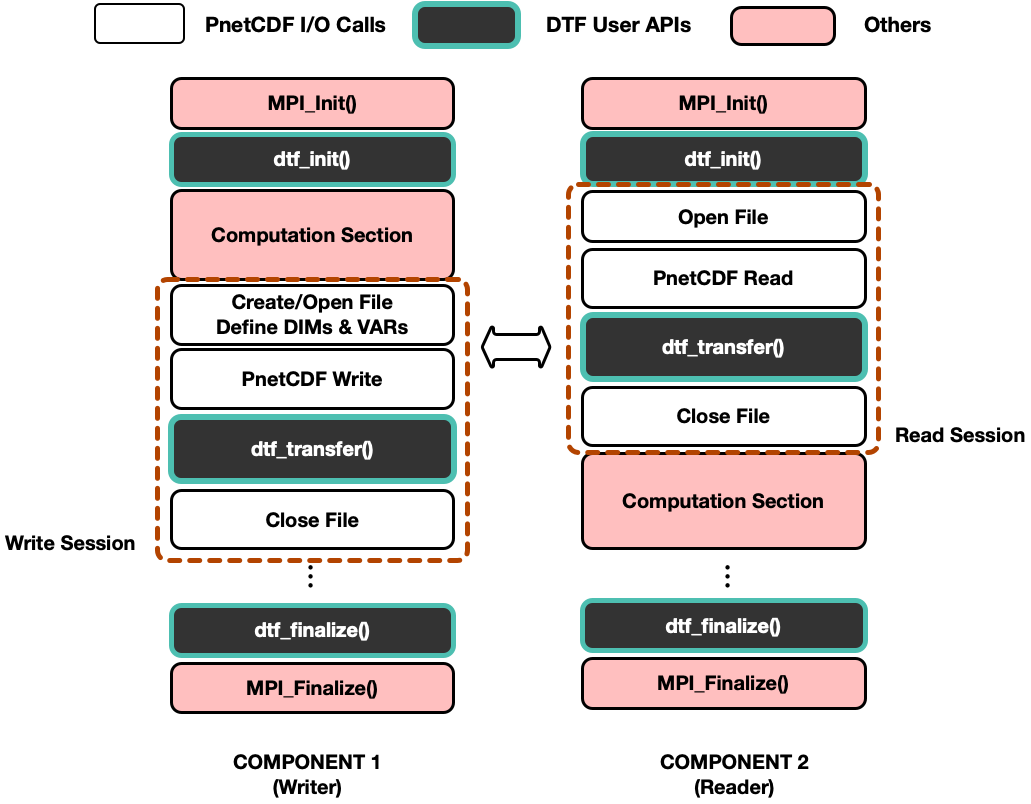
Fig. 3 An brief overview of a DTF-based workflow.
Warning
Users are responsible for deciding when dtf_transfer() should be called to ensure that by the time all the read requests collected can be covered by the collected write requests.
Users should not modify or use the data buffers until dtf_transfer() is complete. Write buffers can be reused only if the buffer_data option is enabled in the DTF configuration file.
The DTF library also provides Fortran version of the user interfaces described above.
To import the functions to the Fortran program, each function should be delared as external, e.g. external dtf_init.
Each Fortran user interface contains an additional integer parameter error for storing error code.
! Initialize the DTF library
! Example: call dtf_init('../dtf_config.ini'//CHAR(0), 'comp1'//CHAR(0), error)
!
DTF_INIT(FILENAME, MODULE_NAME, ERROR)
CHARACTER(*), INTENT(IN) :: FILENAME
CHARACTER(*), INTENT(IN) ::  MODULE_NAME
INTEGER, INTENT(OUT) :: ERROR


! Finalize the DTF library
! Example: call dtf_finalize(error)
!
DTF_FINALIZE(ERROR)
INTEGER, INTENT(OUT) :: ERROR

! Start data transfer
! Example: call dtf_transfer('../data/analysis.00001'//CHAR(0), 0, error)
!
DTF_TRANSFER(FILENAME, NCID, ERROR)
CHARACTER(*), INTENT(IN) :: FILENAME
INTEGER, INTENT(IN) :: NCID
INTEGER, INTENT(OUT) :: ERROR
2.3. Step Three: Compilation and Execution
2.3.1. Compilation
After the above preparations are complete, all the components should be compiled with the DTF library and PnetCDF library using MPI compiler.
Assume that the path to the DTF library is DTF_SRC_DIR, and PnetCDF library is installed in the directory PNETCDF_INSTALL_DIR.
Users should append the following values to the original build options of each component. For example:
CFLAGS += -I${DTF_SRC_DIR} -I${PNETCDF_INSTALL_DIR}/include
LIBS += -L${DTF_SRC_DIR} -L${PNETCDF_INSTALL_DIR}/lib
LDFLAGS += -ldtf -lpnetcdf -Wl,-rpath=${DTF_SRC_DIR} -Wl,--disable-new-dtags
2.3.2. Environment Variables
Before execution, there are some compulsory and optional environment variables provided by DTF to further adjust its runtime behavior.
The only compulsory environment variable is DTF_GLOBAL_PATH, which should be set into the path toa directory that can be accessed by all the processes in the workflow.
The optional environment variables are listed below:
MAX_WORKGROUP_SIZE: The number of processes that will be handled by each matcher process. (Default: 64)# of matchers per component = # of processes per component /
${MAX_WORKGROUP_SIZE}The value of this variable affects the overall performance. It’s recommended to execute the program with different values and find the best setting.
DTF_VERBOSE_LEVEL: logging levels. At each level, addtional information will be output tostdoutbesides the lower-level output. Available values are listed below. (Default: 0)0 - output only errors and warnings
1 - output debug information additionally
2 - output extended debug information additionally
DTF_INI_FILE: path to the configuration file. (No default value)If this variable is set, the path passed to the
dtf_init()parameter will be overriden.
DTF_PRINT_STATS: DTF will collect and output internal execution statistics if this variable is set. (Default: 0)DTF_USE_MSG_BUFFER: DTF will use the preallocated buffer to transfer data if this variable is set. The size of this buffer is defined by the variableDTF_DATA_MSG_SIZE_LIMIT. The writer process will transfer data to the reader process(es) in a sequential manner if this variable is set. Otherwise, the writer process will transfer data to all the matched reader process(es) in parallel, which may consume more memory. (Default: 0)DTF_DATA_MSG_SIZE_LIMIT: as introduced above, this variable is used in conjunction with the variableDTF_USE_MSG_BUFFERto define the size of the preallocated buffer. (Default: 64 MB)DTF_VAR_BLOCK_RANGE: the length of the divided data block in the slowest changing dimension for each matcher process if the value of this variable is bigger than 0. (Default: 0)By default, the slowest changing dimension of a data array will be divided among the number of matcher processes. Each matcher process will be responsible for its assigned data block.
DTF_TIMEOUT: the timeout limit of DTF. The application will be terminated if DTF does not progress within the defined time limit (Default: 180s)The time limit will be ignored if
DTF_IGNORE_IDLEis set
DTF_IGNORE_IDLE: if this variable is set, the application will keep waiting even if DTF is not progressing. (Default: 0)MPMD_COMP: the value of this variable is used for distinguishing between the components in MPMD execution mode. The value should be unique for each component.
2.3.3. Execution
There are two different execution modes can be used to run a DTF-based workflow, background execution and MPMD launch mode.
Assume that a workflow contains three components, which are comp1, comp2 and comp3.
The number of processes for each component are nproc1, nproc2 and nproc3.
Background execution: each component will be executed by a separate
mpiexec
mpiexec -np ${nproc1} ... ${comp1} &
mpiexec -np ${nproc2} ... ${comp2} &
mpiexec -np ${nproc3} ... ${comp3}
MPMD launch mode: execute all the components by the same
mpiexecand separate the executables and local options by:
mpiexec -np ${nproc1} ... ${comp1} : \
        -np ${nproc2} ... ${comp2} : \
        -np ${nproc3} ... ${comp3}
To use the MPMD launch mode, the Splitworld wrapper introduced in 1.3. Build Splitworld Wrapper Library (Optional) should be loaded to each component by either setting LD_PRELOAD environment variable to the path of libsplitworld.so or manually linking the library to each component during compilation.